

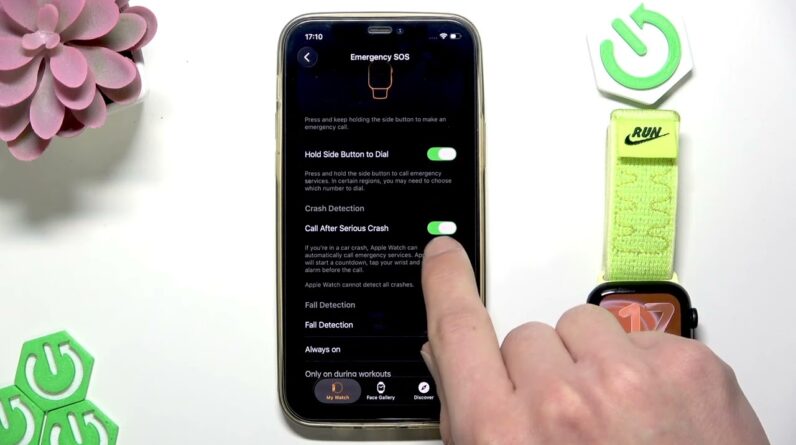
If you want to make your Apple Watch SE 3 even safer, enabling fall detection and crash detection is a smart choice. In this video, we show you step-by-step how to turn on both fall detection and crash detection features using your paired iPhone. You’ll learn exactly where to find the settings in the Watch app, how to activate each option, and how to customize fall detection to work always or only during workouts. With these features enabled, your Apple Watch SE 3 can automatically alert emergency services if it detects a hard fall or a severe car crash, giving you extra peace of mind every day.
How to enable fall detection on Apple Watch SE 3?
How to turn on crash detection on Apple Watch SE 3?
Where is the emergency SOS setting on Apple Watch SE 3?
0:00 Introduction
0:05 Open Watch app on paired iPhone
0:15 Go to Emergency SOS settings
0:25 Enable Crash Detection
0:32 Enable Fall Detection and choose activation option
0:45 Summary and tips
#AppleWatchSE3 #FallDetection #CrashDetection #AppleWatchTips
Find out more:
https://www.hardreset.info/devices/apple/apple-watch-se-3-44mm/
Follow us on Instagram ► https://www.instagram.com/hardreset.info
Like us on Facebook ► https://www.facebook.com/hardresetinfo/
Tweet us on Twitter ► https://twitter.com/HardResetI
Support us on TikTok ► https://www.tiktok.com/@hardreset.info
Use Reset Guides for many popular Apps ► https://www.hardreset.info/apps/apps/