

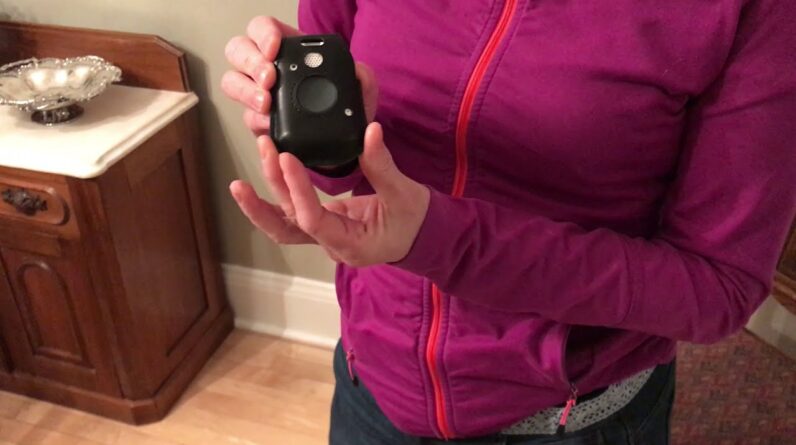
We are here today to demonstrate the #Mobile #LTE medical alert device so that viewers can witness #Medical #Alert’s quick response time first hand. In the video, the #Alert #System Expert removes the mobile device attached to her belt and presses the emergency button. An automated voice informs her that an emergency call has been placed. Within 19 seconds, a Response Center Associate connects to the call and asks if help is needed. After the Expert confirms that the call is just a test, the associate disconnects.
The #Medical #Alert Mobile LTE is a small, discreet medical alert device that comes with important safety features such as two-way talk and GPS location detection. It can also be used in conjunction with the Medical Alert Mobile App which offers caregivers additional functions like emergency notifications and location detection for caregivers. Because the mobile device is designed for those with defibrillators or pacemakers, it should be worn attached to a belt, away from the medical devices. However, an optional fall detection pendant can be worn safely around the neck.
#Connect #America, Medical Alert’s parent company, has been in the healthcare technologies industry for 35 years. They consistently provide a fast response time – one of the best in the industry. For this reason, as well as the features mentioned above, they are worth your consideration.
Learn more about Medical Alert and other highly-rated alert systems at https://www.safehome.org/.
Note: We receive free products and participate in affiliate programs.
Time Stamps
0:00 SafeHome.org’s Alert System Expert introduces Medical Alert’s Mobile LTE.
0:17 The Alert System Expert shares that the Mobile LTE has been designed specifically for people who use pacemakers or defibrillators.
0:29 The Expert removes the device from her belt and points out that the device can be used while still in the case.
0:52 The Expert presses the emergency button on the device to call the Response Center.
0:55 An automated voice announces that an emergency call is being placed.
1:11 A Response Center Associate answers the call.
1:18 The Response Center Associate asks if help is needed.
1:20 The Expert reports that she is testing the system.
1:44 After confirming that everyone is safe, the Associate disconnects.
Read our full written review of the Medical Alert On the Go + Button system here:
https://www.safehome.org/medical-alert-systems/medical-alert/reviews/
And follow these links to learn even more about Medical Alert and similar alert systems for seniors:
Medical Alert Pricing and Packages: https://www.safehome.org/medical-alert-systems/medical-alert/
Medical Alert Systems Buying Guide:
Best Medical Alert Systems of 2021: https://www.safehome.org/medical-alert-systems/best/
Medical Guardian Review: